Sunday, November 24, 2013

Securing Your Firefox

While its popularity suffers from a decline in the past year or two, Firefox is still a great browser which has a lot of things to offer. One of those things is the ability to control whether a plug-in will start automatically when the relevant content is being loaded, or should the browser ask for the end-user’s permissions to activate the plug-in on a per-site basis.

When can the above functionality be most useful? When defending against malware. The sad truth is that being infected via a drive-by malware is something that can happen to anyone, regardless the security measures being taken (e.g using Linux or OSX, having an anti-virus running or using a browser which is not IE). Due to the increased efforts in making it secure, Firefox has very little known vulnerabilities in the core browser engine, forcing the bad guys to opt for its plug-ins as the attack vector.

Unfortunately, Adobe (maker of Flash and Reader) and Oracle (maker of Java) are still doing a so-so job in terms of making secure software, thus it is recommended to have their plug-ins run only when the user approves them to run.
As a matter of fact, I’d recommend getting rid of Java and Reader entirely, yet Flash is still needed for many sites, thus cannot be discarded easily.

So how could one make Firefox ask for a permission to run such plug-ins? Easy:
  1. Open the “tools” menu and choose “add-ons” (ctrl-shift-a for non OSX users).
  2. Choose the “plug-ins” tab on the left panel.
  3. Choose “ask to activate” for the not-so-secure plug-ins.
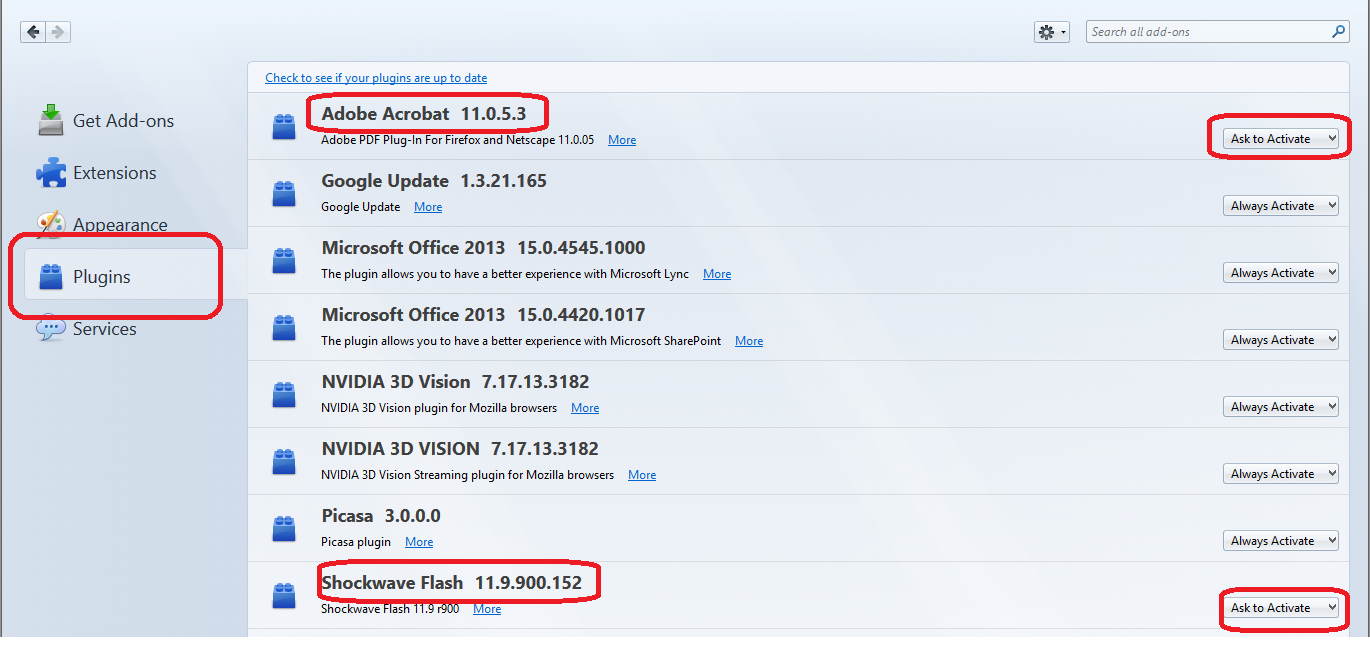


That’s it. Have a safe browsing.

Friday, November 8, 2013

Be specific with your python conditionals

Here’s a mistake in Python that I saw getting done time and again:
some_val = some_dict.get(some_key, None)  # the None is optional in this case
if some_val: do_something(some_val)
What’s wrong?
Usually, the person who writes such code wants do_something to run whenever some_value is not None, yet if some_val is an empty list, empty dict or even the number 0 - do_something will not run! The right way to do it is:
if some_val is not None: do_something(some_val)
alternatively, one can check
if some_key in some_dict: …
Both options are more verbose and will get the job done.

The OSX ‘open’ command

A few days ago I was asked “how can one open more than a single instance of an application in OSX?”. The question was raised because by default OSX will open the already running application instance when an application icon is clicked (or entered via spotlight) more than once.
My first guess was to invoke the application executable directly from the command line - and it worked. But then it made me think maybe there’s a better way to do it, so I found the open command. This command is quite versatile, allowing one to “open” a file with its default handler application or with an alternative one, open any file with a text editor, stream the standard input to a text editor, fix applications which has windows that has gone out-of-view and more. For the above requirement, the “-n” flag can be used, such as:
open -n /Application/RStudio.app
The application becomes independent from the terminal session and the prompt can be used to re-launch another instance immediately. Simple and elegant.

Monday, January 28, 2013

Alexa domain ranks in Python

After the 10th time that I've developed a similar capability, I finally decided I should create a public, open-source, Python library for getting the Alexa rank given a URL.
Even though it's not complicated, I imaging many people could enjoy such ability. Also, I'm open for suggestions if anyone requires enhancements.

I'm currently thinking about creating a Node.js web API which provides similar abilities, for those who prefer having this solution accessible in such a manner.

The code can be found on Github.

Tuesday, December 4, 2012

SQLite DB with Orange Data Mining

The following post has no agenda or moral. It's just a story about stuff I did at work and some code I published.

Not a long time ago I was requested to bring my data-mining knowledge back from the dead. The project is actually quite fascinating, something in the software security field, and it's a shame I cannot provide much more details in this blog.
Anyway, since budget is low, and I tend to prefer open-source solutions, I installed Weka and Orange on my machine. Since the raw data to be processed is stored in a SQLite DB and since I recall I had better experience with Weka - I went for the first.
After a few hours of breaking it and trying to get it to produce some decent classification rules, I gave up on it. I guess that the fact I now love Python more than Java (it wasn't always like that) had quite a serious weight on my decision to stop trying to get Weka to work, so Orange it is.

Unlike my previous experience with Orange, back when I was a student, I figured I should go with the core framework - no UI, only Python commandline and scripting using Orange's extensive data-mining libraries.
After refreshing my memory with the tutorials, I felt comfortable with it, yet I realized Orange isn't capable for handling SQLite DBs. Instead, it uses some of the industry's common file formats for data-mining, and TSV. Yes, TSV. But this shouldn't stop me, right?
Few minutes later, I had my first SQLite-to-TSV converter up and running. You can find the sources on github.

From here, everything was a breeze: some data fiddling, some algorithms threshold settings, and results started to appear. Cool.

Monday, September 24, 2012

Boring Android UI


I am an Android user for a year and two months now. The only Android device I have ever owned is the Samsung Galaxy SII. Before that, I had installed nitdroid on my N900, but it was mainly for fun and the ability to show off how great the N900 was. My only previous experience with smartphones UI was with devices made by Nokia: E65, N95 and as mentioned, the N900. The first two had:
  • A home screen with a single row of the most useful apps, similar to the bottom row usually found in modern smartphones.
  • A menu of all of the other apps, which is basically a grid of icons and folders containing icons. Exactly like what can be found in modern smartphones.
The N900 was more refreshing, as it supported widgets, kind of like what you can find on Android devices (hi Apple, people love having widgets, seriously).
So when I got my Android device, I felt at home right away with the new desktop environment, which originally was the TouchWiz launcher. Actually, I can't understand Apple's claim of Samsung copying its UI from them, since it reminded me much more of the Nokia UI, but never mind...
After playing around with the device for a while, I figured I should be switching to other launchers, to get a richer experience of what can be done with the Android desktop. But seriously, other than effects and perhaps smarter widgets, there was nothing more to it.
Recently I tried Launcher 7, which is supposed to mimic the Windows Phone experience on Android devices. Since I have only one friend who owns a Windows Phone device (and he is a MS employee, so you cannot credit him for actually buying the device), I wasn't very familiar with the Windows Phone UI. After a using it for a while I was really impressed. This is a really fresh smartphone UI, which doesn't resemble anything else out there, and most importantly - doesn't resemble the UI I had back in 2007.
Does it mean I suggest you all to start using Windows Phone? no. It does mean that there is place for innovation which I hope will happen as soon as the new Windows Phone devices will start gaining market share.

Update: in the week that past since I wrote the first draft of this post, I've demonstrated Launcher 7 to several other Android users and all of them were really impressed as well. I guess there's something to it...

Monday, May 14, 2012

Blogging for the .NET framework

A system I've been working on is based on the .NET framework. It seems that Mono and Apache on a web server is a pretty good combo, and I recommend everyone with a spare day or two to give it a try.

Anyway, I needed to run a blogging engine on that same server and have that blog support Hebrew and right-to-left languages. While there are several good blogging engines for .NET, not all would run on Mono and most doesn't do the RTL part good enough.
My first attempt was to use SubText, but getting rid of the SQL Server dependency and adding the RTL support became too much of a hassle. I picked SubText for it being notorious for its simplicity and elegance, but while I was ready to invest some customization time, it demanded too much of it.
My second attempt was BlogEngine.NET. What can I say - I fell for it almost immediately. The platform is versatile enough to support not only many RDBMS's, but it also allows storing the posts in XML files. Nonetheless, the translation to Hebrew wasn't complete and there was no RTL native theme for it. So I made one.

BlogEngine.NET is hosted on CodePlex and uses Mercurial for its source control. I had a fork of the project in no time, so I started making the required changes and created a new theme based on the default one. Since I don't want to maintain a fork of the project for eternity and since I want others to enjoy this new feature, I've sent a pull-request which was accepted yesterday. So starting from version 2.5.0.6, you can enjoy BlogEngine.NET for your Hebrew blog.

As always, it feels good to contribute back and to know that my code can be further enhanced by other developers.

Happy blogging.

Saturday, March 17, 2012

Starting Mono Development In No Time

For anyone coming from the Linux world, getting up and running with a development machine is a matter of minutes. All one has to do is use his favorite package manager in a manner similar to this:
apt-get install mono monodevelop mongodb python...
And just sit back and wait.

But what do you do in those days when you have to use Windows for development? What if using a Linux VM isn't a viable option?
Enter Chocolatey.

Chocolatey is a superb open-source package manager based on NuGet which brings the benefits of package management, including keeping your software up-to-date, to Windows. Due to its core, I believe that it was initially targeting .NET development, but this is not the case anymore. Among the packages I install are GnuWin (because you can't live without the GNU command line tools), node.js, mongodb and python. Obviously, one can use it to install Mono and MonoDevelop.

I believe that with the great community that has started to evolve around Chocolatey, the repositories will grow richer and into more areas, and Windows development would become as fun as Linux development.

Enjoy.

Friday, February 17, 2012

Creating Wireframes with Pencil

When working on a project which requires a user interface, it is usually best not to jump ahead and start programming the UI part before making some sketches first. It makes sense, since UI development shouldn't be different than library/API development. The client is different, but the principals remain.

For a long time I've been a Balsamiq Mockups person. I know, it's not open source, but they'd used to give licenses to those who blogged about it. Also, few years ago, Balsamiq was far superior to other solutions and it contained much needed features.
This is not true anymore. For the past few months I've been using Evolus Pencil and I can tell you it's great. First - it's open-source. Second - it has ports to all platforms and can also run as a plugin for Firefox. Moreover, it is customize-able, extensible and very flexible.

So if you've decided to give Pencil a try, here's a tip that would make your wireframes look a bit more serious and professional: right click the "Sketchy GUI" collection in the collections tab, and select "Collection Settings...". Navigate to the "Text" tab in the resulting dialog, and change font family from "Comic Sans" to a font that you might actually use for the final product.
Want another tip for general wireframes design? Don't ever use "loren ipsum" as a text filler. Wireframes should be later translated into real UI and graphics design, so you don't want to find out that that text area you've been designing doesn't fit the needs of your application. Always wireframe with real data.

Those were my two cents for wireframes using open-source software. Hope it helped.

Saturday, January 7, 2012

Using App.Config in IronPython

I love python very much, and as you probably already noticed, I love C# as well. I already have many libraries and utilities developed in those languages, and for me, the ability to reuse code between those languages, is a must.
So I came to know IronPython, which is a complete Python implementation for the .NET platform, using the DLR. For most of the time, the integration between the two is a breeze. All you have to do is "clr.AddReference" your .NET assemblies, and you're good to go.

Unfortunately, with more complex projects, there are some caveats. Most notably is the missing ability to load app.config (or web.config, or any other .config) files from IronPython. Without diving too much into details, the reason is the way AppDomain works in .NET. It is looking for [assembly name].config file when one is requested using the ConfigurationManager. Since IronPython code is invoked with ipy.exe, the configuration file must be called ipy.exe.config. I suppose the same goes with IronRuby as well. This is a serious limitation.

Thanks to Tom E. Stephans for providing this awesome proxy for the ConfigurationManager. Basically, his code injects some logic to the inner workings of the ConfigurationManager, that allows us to specify which config file to be loaded. This config file will be seamlessly loaded by the ConfigurationManager when needed.
Unfortunately, Tom's code doesn't exactly compile. Probably due to some copy-paste issues he had when publishing it. So I did some minor modifications, and removed the part of the code responsible for loading custom configuration sections and uploaded it to Bitbucket, so everyone can use it. The code is available here, along with a sample usage python script.

Few things to keep in mind regarding my code:

  • It was compiled using Mono 2.10 like this: mcs ConfigurationProxy.cs -t:library -r:System.Configuration
  • It was tested both under Mono and under MS .NET framework 4.0.
  • There's a sample config file called blogsample.config which contains a demo connection string. This configuration file is loaded in test.py and the connection string is printed.
  • Just like the ".ConnectionStrings" collection is accessed, one can access the ".AppSettings" collection.
  • Since the injection is done to the ConfigurationManager, implicit usage attempts will also work. For instance, the SubSonic ORM which requires a connection string, will work seamlessly.
Once again, kudos to Tom for his great work. I hope you will find my corrections and sample useful.

Friday, October 28, 2011

TRouBLe is Useful

Web programmers have probably seen this a lot:
margin-top: 10px;
margin-right: 20px;
margin-bottom: 10px;
margin-left:20px;

The reason many programmers "need" 4 lines of code for such a simple thing, is that it's impossible to set the margin (margin is just an example, since this is also true for padding/border/...) to 20px, and then override just the top margin. But isn't there a better way?

Well, there is a shortcut for the above:
margin: 10px 20px;

Shorter, heh?
The parameters for attributes such as margin, are specified in this order: Top Right Bottom Left, or TRouBLe for short. CSS parsers are smart enough to apply the last specified parameters, to those that were omitted. So in the above example, I've omitted bottom and left, so the 20px value would be applied to those as well.
The general rule is:
* if only one value is specified - it is used for all (top, right, bottom and left)
* if two values were specified - the first will be used for top and bottom, and the second for left and right
* if thee values were specified - the first will be used for the top value, the second for the left and right values, and the last for the bottom value
If I wanted to set the margin-left to 10px, I'd have to write this "long" statement:
margin: 10px 20px 10px 10px;
Which is still shorter than the first example above.
Many times, the shortened syntax can be used, and save us some typing while increasing the expressiveness of CSS attributes.

EDIT: It seems I messed up a bit the order in which things are shortened. Thanks for Tomer for correcting me. I've updated the post accordingly.

Wednesday, October 26, 2011

Installed Apps Doesn't Show in Market

Today I noticed an annoying bug in the Android Market application: it showed only 3 applications under the "my apps" section in the market, even though I have over a couple of dozen installed.

Rebooting the device or removing the SD card didn't help.
Being rather new to Android, I was tempted to remove the market application, and reinstall it. But Android is much like Linux, and much less like Windows, so reinstalling an application would probably retain the old settings.

And then it hit me - the settings. Why not reset those?

Simply go to: settings -> applications -> manage applications -> market -> clear data
That's it. The next time the market app launches, it will rescan the installed applications, and everything will be fine again.
That's pretty robust, even though it's in a geeky way, since I don't expect most people to do that.

Friday, October 21, 2011

Best Windows Development Environment

I know, this one is going to sound a bit crazy, but hear me out. IMHO, the best Windows development environment is Linux.

First, let me start with a less surprising statement: the best way to run a Windows installation is on a VM. This should make perfect sense to anyone who runs Windows on a daily basis, and knows that as time goes by, it simply gets slower.
No registry or other cleaning utilities can return it to run as fast as it was the day you installed it.
Moreover, when one wants to test a new piece of software, the VM's snapshot feature really shines.
So, every once in a while, one can revert to the a stored snapshot, and get an almost fresh Windows installation, almost instantly.

When it comes to development environments, where one rarely install tools, and the code is managed in source-control, reverting to a snapshot is even easier.

My second point is: use the host environment that you feel most comfortable with. In my case, it's Linux. Specifically Ubuntu. If you prefer running a Mac or a different Windows as the VM guest, it's OK as well. But I can assure you that after giving Linux a trial period as the host OS, you'll find it the most pleasant one.

Moreover, if cross platform compatibility is an issue for you, having Linux *and* Windows running simultaneously, is a great advantage and a real time saver.

Sunday, September 25, 2011

C# Extension Methods

One of my favorite features in C# is Extension Methods. Let me explain why.

Did it ever happen to you that you needed to add a method to a class you cannot edit, and inheritance couldn't help as well?
This can happen in various opportunities, especially when working with libraries and SDKs that uses a certain class for its internal operations, and exposes this class to the user as well.

In such cases, in languages that doesn't support extension methods, the only way to add functionality to that class, is to write a "helper" class or method, and use it.

C# Provides a better way.
Let's say you have a blogging system, and you have a blog summary page, that displays only the first 100 characters of each post, as a teaser. There could be many ways to get the shortened text, but image you could have your own String class, that provides a method that displays the entire post if it's less than 100 characters long, and displays only the first 100 characters and "..." if it is longer.

Have a look at the following extension method:


public static class StringExtension
{
        public static String ShortenText(this String str, int length)
        {
                if (str.Length > length)
                {
                        return str.Substring(0, length) + "...";
                }
                return str;
        }
}


Simple. This code needs very little explanation. All it does is create a new extension method for the String class that implements the logic described above. Here's a sample usage for this new method:

Console.WriteLine("12345678".ShortenText(5));


The output of this would be "12345...", as you'd expect.

The possibilities of extending built-in classes provided by C# and the various libraries, such as ASP.NET MVC, are endless. Just make sure you don't abuse it.

The full source code of the sample given above is available on my bitbucket samples repository. It compiles on Mono as well as on MS C# compiler.

Friday, September 23, 2011

Ubuntu 11.04 and Unity

For a long time I've been a 10.10 user. Probably too long. To tell you the truth, I couldn't care less. Everything was so customized to my own needs, and everything worked perfectly.
Moreover, since most of my development nowadays is done on a Windows box, I didn't feel the urge to try something new on Linux.
Finally, there were so many bad reviews about Unity, and "thanks" to those I had second thoughts about replacing the desktop environment.

Last week I took the "risk", and you know what? I love it!
I had 11.04 installed both on my workstation and my laptop, and I can easily say it's one of the best Ubuntu versions I used.

On my laptop, I rarely connect a mouse, and I hate touchpads. This means I use the keyboard almost exclusively. Unity seems to be adapted to this, so it provides great keyboard shortcuts. Now I need the mouse even less.

On the workstation, even though I have a big screen with a "big resolution", I always try to find the best utilization for the screen space real-estate. If you ever seen a those 30" mac wide monitors that have the mac dock dragged to the left edge, you know what I'm talking about.
Unity also knows what I'm talking about.

Also, performance is great, as ever. Far better than using Windows. Ubuntu never misses this one.

I wish I didn't wait so long to try Ubuntu 11.04 and Unity. On the other hand, since this version is quite mature, there's a chance I saved myself some of the glitches and bugs it had 5 months ago.

Sunday, September 18, 2011

Trello and Blogging

If you're following TechCrunch Disrupt, or have been reading the recent news from Joel Spolsky, you've probably heard by now about Trello.

If you haven't, let me bring you up to date. Trello is a note taking application aimed to replace ordinary to-do lists and sticky notes used in project management. Every note taken, dubbed "Card", can be much more than a sticky note, as it can contain background text, votes, embedded objects and even someone "assigned" to the card. Cards are organized in lists which are organized in boards.
If you've ever seen agile project management techniques, such as Scrum, you'll be familiar with the board filled with columns of sticky notes, and sticky notes being able to "move" between columns. That's exactly like that.

So far, in order to see what Trello is worth, I've been using it to manage ideas for this blog.
Up until now, ideas for posts where mostly in my head, with some starred items in my inbox that contains the research I did. Now, I have a board with "Ideas", "Collecting information", "Writing", "Follow comments" and "Done" columns. Finally, my ideas are organized and I have a place save the information and even order/rank the ideas before writing posts.

I can see now that I have two ideas I should be working on. If you have more ideas for stuff you want me to blog about, leave a comment, and I'll treat it when this post will reach the "Follow comments" phase.

Monday, August 22, 2011

Home Mercurial Server

I hope I'm not the only one who had this problem:
I've been working on some code demos and web designs and wanted to having it under source control, so I could keep track on changes, work from multiple computers and generally have a backup for everything.
For normal projects, I guess this should be done as an open-source project on bitbucket or github, but in some cases it's simply more convenient to have the repository at home.

So, I installed a Mercurial server. Want to know how?

The only thing you'll need is the Mercurial installation for your favorite OS (yes, Windows included). After installing it, run
hg init RepoName
this will create a repository called RepoName under the current directory.
For the next part, I'll assume the server is accessible only inside the home network, and there's no need to configure extra security measures. So, create a script that servers this repository inside the the repository directory:
hg serve --config web.push_ssl=No --config "web.allow_push=*"
All you have to do now is to schedule this script to run on boot time.
Now, from any machine on the network you can use commands such as:
hg clone http://ServerName:[probably_8000]
to work with your new Mercurial repository.
That's it.

Having a "development server" can be very handy, as it could also hold other documents (NAS functionality), personal wiki, local deployment server, etc.

Saturday, August 20, 2011

People Skills

I've just read this great post which I found on Hacker News, and felt sympathetic.
For too many times in my short career I was forced to work with people that has no people skills. Those people held a programming, admin or other technical roles, which means they weren't "customer facing", so for the employer, there was no need to require people skills when hiring them.

But that's a wrong call in my opinion. Even if the people in question were among the top 5% of the most professional people I met, I'd rather not work with them at all, than suffer their presence. Even if that means spending a few more days on solving some technical issues.

Many things bother me with such people:
  1. Some of them know they're so good at what their doing, and leverage their bad people skills in a way that no one would be able to learn from them. This gives them job security.
  2. Some of them use the fact no one wants to communicate with them in order to get this quiet room "in the basement".
  3. If there's a "dirty job" that involves communicating with customers, obviously they aren't tasked with handling it. That's an ugly way to get only the "nice" tasks.
  4. They get away with ugly code, since no one wants to communicate with them and get them to beautify it or write documentation.
So yeah, I know many people don't go to work in order to socialize, but having people with zero people skills, no matter how professional they are, simply hurts the organization.

When it's time for me to hire employees, be sure that having decent people skills will be a criteria.

Friday, July 22, 2011

Twitter - part 2. Android.

Twitter

So my Twitter 30 days challenge is about to be over, and I think I'm ready to summarize it and write some conclusions:
  • I'm following 17 people, and have 9 followers. Only recently I began to gain an audience. Just like with blogging, it takes patience and persistence.
  • So far I made 43 tweets. I'm pretty pleased with this number.
  • Except for once or twice, all of the replies to my tweets were done on Google Buzz, which is connected to my Twitter account. That's pretty lame, and makes me want to lock both services - more on that, later.
  • Tweeting is fun. I didn't think I'd say that.
  • The TwimGo client for N900 is great. The official Twitter client for Android is just perfect. Not having a Twitter mobile client renders is useless. This could be another reason for Google Buzz failure, as it doesn't have a decent mobile client.
  • 140 characters limit makes a lot of sense when posting from mobile. Longer than that is cumbersome. When posting from PC - it's too limiting.
So, am I going to keep using Twitter? For following people - yes. For replying to people - yes. For publishing stuff - probably no.
I guess most of the stuff I publish today on Twitter, will be published to "public" or "extended circles" in Google+ instead.
This means that my short "romance" with Twitter will probably end soon. While it's a lot of fun, it provides little gain compared to Google+. Perhaps had I joined 2 years ago, I'd stick to it until I know my followers would follow me to Google+.
It doesn't mean I'm going to generate too much noise in Google+ either, since I believe posts that complains about the Israeli heat will probably be published only to "Friends".

As a final note for this topic: I just removed the Google Buzz tab from my GMail and disconnected all of the accounts associated with it (Twitter, Google Reader, this blog). Since I never bother looking at the Buzz tab in Google+, this means I will ignore everything going on in there. I don't see the point of having a place where I need to follow people's comments on stuff published in other places. Comments for this blog should go here. Comments for Google+ should go there.


Android

This week was a happy and sad week in terms of mobile devices. Not sad as in tears, but somewhat sad. After 10 years of owning 5 different Nokia devices, I switched to a brand new SGS2 running Android Gingerbread. My last Nokia device was the N900, which is by far the geekiest toy I ever owned. No other smartphone can be tinkered by modifying things under /etc, and get updates using apt-get. A truly open-source device.

In the past few days I had very little time to dig into Android. They say it's Linux. IMHO, it's barely noticeable. No glibc, different filesystem structure, etc. I learned about odex, kernel versions and other fun stuff that will surely waste (in a fun way) many hours of my time in the near future. Can't wait.

P.S - if you want to follow me on Google+, you can use gplus.to/mosh. I don't know how long this link will last, though I hope forever.

Sunday, July 10, 2011

When the Safety Net Fails

It's been quite some time since my sysadmin/DBA skills were put to test. Usually, when they do, it means something bad has happened.

Recently, a server I'm responsible for, suffered some a catastrophe in the form of a power outage. Usually, when such things happen, and the UPS (if such exists) fails, one is still relatively safe, since corruptions to the data itself will be handled by the RAID. This means that if one HDD fails - you can pull it out and push in another - and everyone's happy.

Not my case. In the last power outage something far worse has happened - the RAID controller died. As you may know, with many RAID controllers this means long nights of data recovery, since rebuilding the RAID will cause initialization of the disks, which means total loss.

This is the kind of the events no one is planning for in terms of redundancy. The only redundancy possible is a second server in a cluster configuration, but it doesn't solve exactly this problem, and has its costs. Backup is another form of "redundancy".

So, the component that was supposed to save us in case of failures - failed us.
Luckily, with some witchcraft, we managed to reconstruct the RAID, losing only 1 of the logical drives. That drive had to be restored from backup. Yet, that was the easier thing to do, as another drive, containing the DB, appeared to be alright, while it actually hid a far worse problem - corruptions in the DB. Did I already mention it's good to have backups?

My conclusions were also applied on my home equipments - have a detached (as in "doesn't require power 24/7") backup, and get yourself a good UPS.